JavaScript objects are powerful data structures that allow you to organize related data into a single entity.
- The Math object contains mathematical functions and constants. It is often used for performing mathematical calculations, such as rounding, square roots, trigonometric functions, and more.
- The Date object allows you to work with dates and times. It can be used to create new date objects, access components of a date (such as day, month, year), and perform various operations between dates.
- The Array object is a built-in object used to create and manipulate arrays. It includes many methods for working with arrays, such as adding or removing elements, sorting, filtering, and more.
- The String object contains methods for working with strings. For example, you can use methods like
length(to get the length),toUpperCase(to convert to uppercase),substring(to extract a substring), and others. - The Object object is the base object in JavaScript, used as the foundation for all other objects. Its methods can be used to create objects, add and access properties, copy objects, and more.
let auto = {
    mark: "audi",
    mudel: "S class",
    aasta: 2022,
    varv: "punane",
    lisavarustus: ["kliimaseade", "elektriaknad", "navigatsioonisüsteem"]
};

console.log(auto);
Object Methods and Using this
Objects in JavaScript can contain not only properties but also methods. Methods are functions within an object that can manipulate the object’s properties or perform other actions in the context of that object. The this keyword is used inside methods to refer to the object in which the method was called. For example, we can add a method to a previously defined car object that displays the car’s full name. To allow the method to access the object’s own properties, the this keyword must be used.
let auto = {
  //omadused
  mark: "Toyota",
  mudel: "Corolla L",
  aasta: 2022,
  varv: "punane",
  omadused: ["kliimaseade", "elektriaknad", "navigatsioonisüsteem"],

  //meetodid
  taisnimi: function() {
    return this.mark + " " + this.mudel;
  }
};

console.log(auto.taisnimi());
Method Shorthand
The new JavaScript ES6 now allows methods to be written in a shorter, more concise syntax.
let auto = {
    mark: "audi",
    mudel: "a4",
    aasta: 2022,
    varv: "punane",
    omadused: ["kliimaseade", "elektriaknad", "navigatsioonisüsteem"],

    //meetodid
    taisnimi() {
        return this.mark + " " + this.mudel;
    },

    kuvaOmadused() {
        this.omadused.forEach(omadus => console.log(omadus));
    }
};

auto.kuvaOmadused();
Arrays of Objects
An array of objects in JavaScript is a data structure consisting of multiple objects arranged by index. Each object is a collection of key-value pairs, where the key is unique and the value holds the data for that key. An array of objects can contain various data types, including strings, numbers, booleans, functions, other objects, and more.
Creating and Displaying an Array of Objects
Creating an array of objects is relatively simple. For example, let’s start by storing data about cars. Each car is represented as an object containing information about the car’s make, model, and year of manufacture.
let autod = [
    { mark: 'Toyota', mudel: 'Corolla', aasta: 2007 },
    { mark: 'Honda', mudel: 'Civic', aasta: 2012 },
    { mark: 'Tesla', mudel: 'Model 3', aasta: 2019 }
];
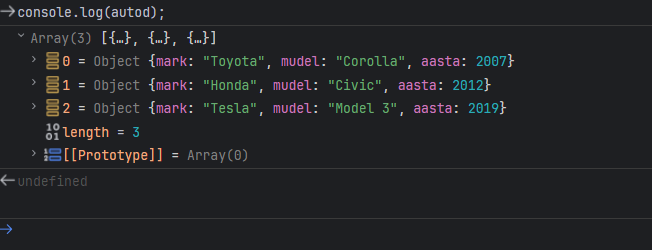
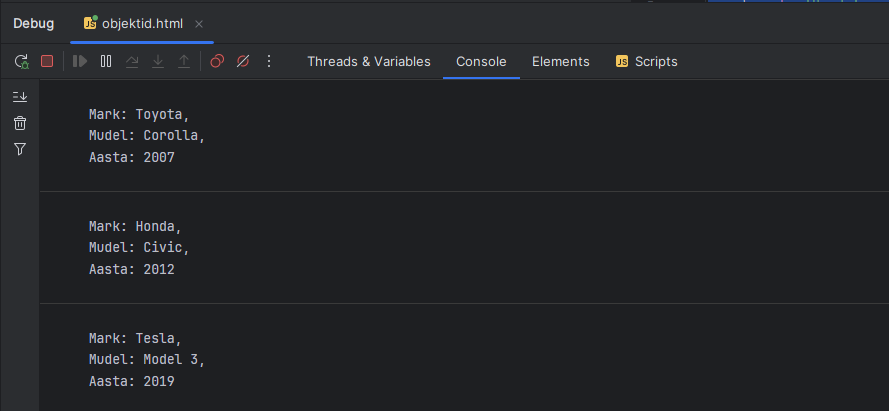
To view all the models, we use a forEach loop again.
let autod = [
    { mark: 'Toyota', mudel: 'Corolla', aasta: 2007 },
    { mark: 'Honda', mudel: 'Civic', aasta: 2012 },
    { mark: 'Tesla', mudel: 'Model 3', aasta: 2019 }
];
autod.forEach((auto) => {
console.log(`
Mark: ${auto.mark},
Mudel: ${auto.mudel},
Aasta: ${auto.aasta}
`);
});
Methods for Arrays of Objects
JavaScript array methods can be used for both regular arrays and arrays of objects. Methods such as push(), pop(), shift(), unshift(), splice(), slice(), forEach(), map(), filter(), reduce(), sort(), and others can be applied regardless of whether the array contains simple data types (like strings or numbers) or more complex data (like objects or even other arrays).
This works because arrays in JavaScript are objects, and storing both simple and complex data in arrays is handled in the same way. The type of data in the array does not affect the array methods. For example, you can add new objects to an array of objects using push or unshift.
